Stop collecting AI tips. Build a personal AI work system you can use every day.
Four practical tools to choose what to use, what to delegate, and what to ignore.
The problem
- Too many tools, not enough clarity
- Copying prompts without purpose
- No system, just scattered notes
- Wasting time deciding what to do
The reframe
- Use fewer tools, with intention
- Follow rules that save time and focus
- Clear boundaries for better results
- A system you can actually stick to
The Tool Audit
| Tool | Keep | Pay | Let go |
|---|---|---|---|
| ChatGPT | ✓ | – | – |
| Claude | ✓ | – | – |
| Perplexity | – | – | ✓ |
| Midjourney | – | ✓ | – |
| Zapier | – | – | ✓ |
Audit your tools. Decide what to keep, pay for, or let go.
The Daily Rules
Set simple rules for how you work with AI every day.
The Boundary Map
Map what to delegate, do with AI, do yourself, and ignore.
The Prompt Vault
Save and organize prompts by use case. Reuse what works.
Pay once
Secure checkout. One-time payment.
Check your email
Get instant access and simple instructions.
Make it yours in one evening
Follow the ready-made system. Fill in your tools, rules and prompts.
No course to sit through and no login to remember — you fill it in once and use it every day.
List the AI tools you use or are considering. Decide what to keep, pay for, or let go.
| Tool | Primary Use | Keep | Pay For | Let Go |
|---|---|---|---|---|
| ChatGPT | Writing, ideation | ✓ | – | – |
| Claude | Analysis, reasoning | ✓ | – | – |
| Perplexity | Research | – | – | ✓ |
| Midjourney | Images | – | ✓ | – |
| Zapier | Automation | – | – | ✓ |
01 The Tool Audit
Get clarity on your tools. See what you actually use, what's worth paying for, and what to let go.
- List every tool you use or test
- Decide: Keep, Pay For, or Let Go
- Add notes on cost, value, and overlaps
- Focus your stack and save time
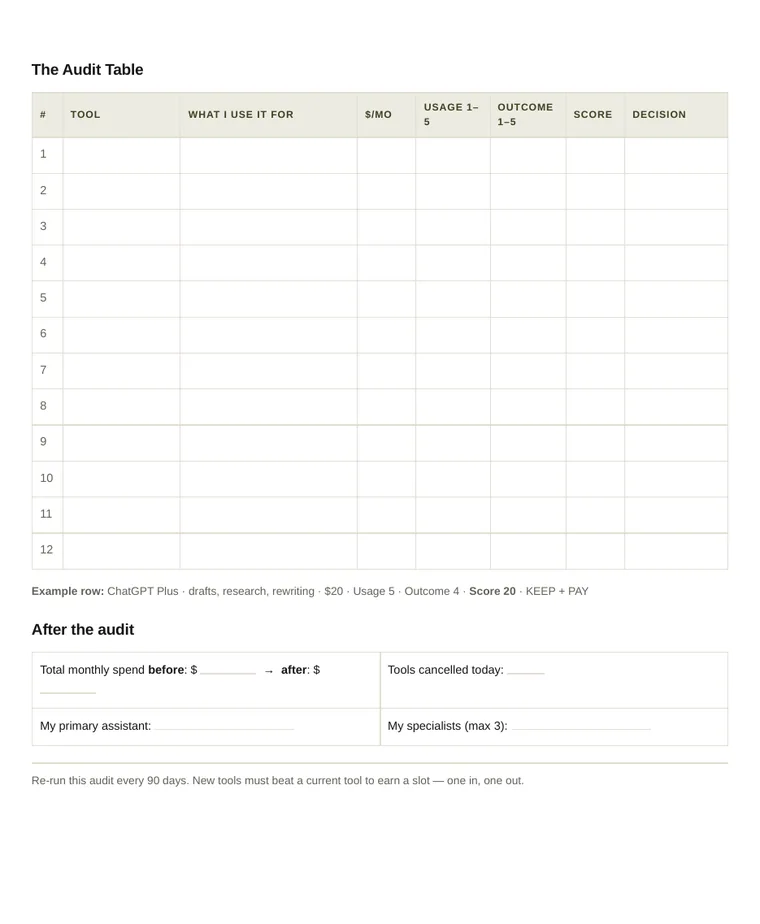
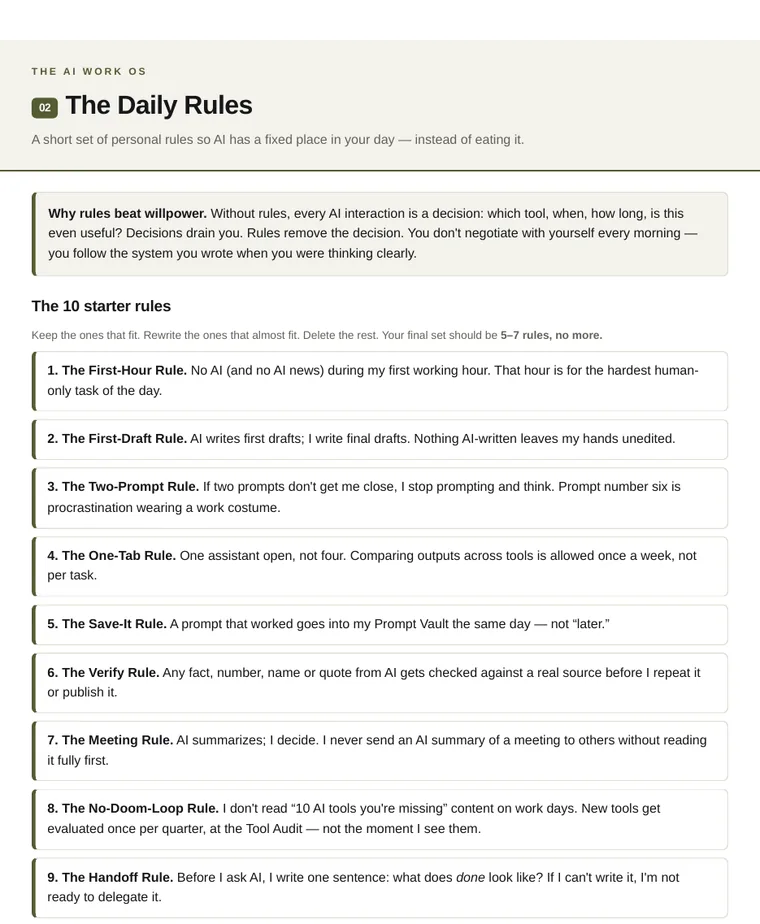
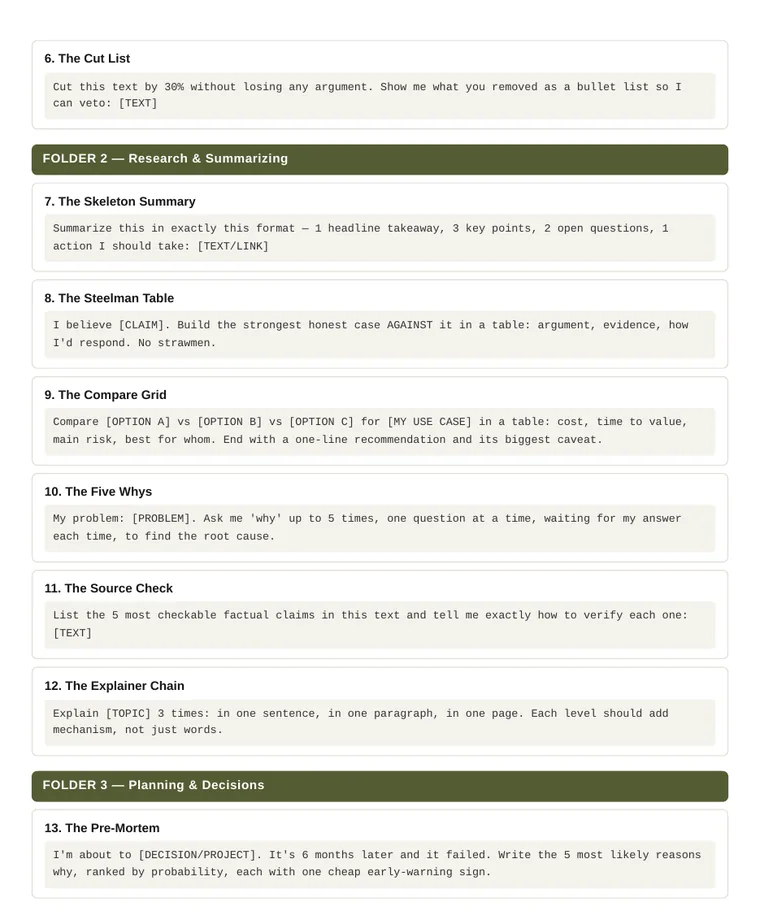
Real pages from the workbook you'll download — not mockups.
The full table of contents — every page and every prompt, listed before you pay.
00Start Here ⌄
- What's inside — the four tools and how they connect.
- The one idea behind all of it — why tips don't compound and systems do.
- Your first 7 days — a day-by-day setup plan, 20–40 minutes a day.
- The weekly loop — the 10-minute Friday review that keeps the system alive.
01The Tool Audit ⌄
- Why the audit comes first — the three costs of every tool you keep.
- The two-question score — Usage × Outcome, so you decide on evidence, not mood.
- Fixed decision rules — Keep + Pay / Keep Free / Let Go, by score band.
- The audit table — 12 fillable rows: tool, use, $/mo, scores, decision.
- The 4-tool cap — 1 primary assistant + 3 specialists, and how to cut to it.
- After the audit — spend before/after, your primary, your specialists.
- The 90-day re-run — one in, one out.
02The Daily Rules ⌄
- Why rules beat willpower — removing the decision, not adding discipline.
- The 10 starter rules — First-Hour · First-Draft · Two-Prompt · One-Tab · Save-It · Verify · Meeting · No-Doom-Loop · Handoff · Shutdown.
- My rules — write your final 5–7 on the page.
- Make them stick — track only breaks; three breaks means the rule is wrong.
03The Boundary Map ⌄
- The three rings — Core (human only), Delegate (AI drafts, you finish), Drop (stop doing it).
- How to fill the map — three questions that sort any task in 30 minutes.
- My 15 tasks — fillable table for your recurring work.
- The delegation contract — the one line that separates delegating from dumping.
- Revisit rule — how tasks migrate between rings over time.
04The Prompt Vault ⌄
- How to use the vault — naming, organizing, and pruning so it stays usable.
- Anatomy of a prompt that works — Role + Context + Task + Format + Quality bar.
- My saved prompts — the table where your own vault grows.
- 1. The Honest Editor
- 2. The Rewrite Ladder
- 3. The De-jargonizer
- 4. The Opening Doctor
- 5. The Tone Match
- 6. The Cut List
- 7. The Skeleton Summary
- 8. The Steelman Table
- 9. The Compare Grid
- 10. The Five Whys
- 11. The Source Check
- 12. The Explainer Chain
- 13. The Pre-Mortem
- 14. The 80/20 Cut
- 15. The Decision Memo
- 16. The Week Planner
- 17. The Scope Knife
- 18. The Tradeoff Surfacing
- 19. The Hard Email
- 20. The Disagree Gracefully
- 21. The Update Nobody Skips
- 22. The Meeting Distiller
- 23. The Ask Shrinker
- 24. The Feedback Sandwich-Free
- 25. The Socratic Coach
- 26. The Mistake Autopsy
- 27. The Mental Model Fetcher
- 28. The Deliberate Rep
- 29. The Book Squeezer
- 30. The Better Question
Not sure? Take a page for free.
One real, unedited page from the workbook — The Tool Audit, ready to print. No email, no signup.
What is The AI Work OS? ⌄
A self-paced system built from four connected tools: The Tool Audit, The Daily Rules, The Boundary Map, and The Prompt Vault. It is not a course or consulting — you work through it at your own pace.
Do I need Notion? ⌄
No. Notion is optional. Printable worksheets are included, so you can use the system with or without Notion.
Can I use this with any AI tools? ⌄
Yes. The system works with ChatGPT, Claude, and any other AI tools — it's about how you work, not a specific app.
Is this a subscription? ⌄
No. Pay $17 once and keep access forever. No recurring charges.
What if I get stuck? ⌄
This is a self-serve product without personal coaching. Email support is available for access issues — reach us at the support address in the footer.
Refund policy ⌄
Try it for 30 days. If it's not a fit, email support@algoritly.com — one email, no form and no questions, and you get the full $17 back.
Can I see it before I buy? ⌄
Yes. Download a real page from the workbook — The Tool Audit, unedited, no email required. The full contents of all five workbooks and the names of all 30 prompts are listed above.